Michy: A Handwritten Font for Creative Makers
There’s something special about a handwritten font that feels like it was written just for you. I discovered Michy while working on a batch of candle labels, and it immediately stood out. Its soft, natural strokes bring a personal touch to any project, whether it's a simple label or an elaborate invitation.
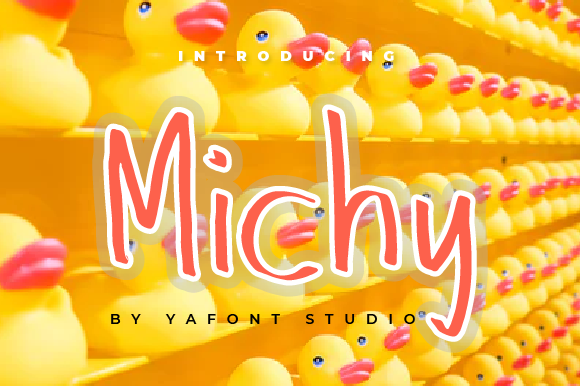
Michy is a handwritten script font with a warm, approachable vibe. It doesn’t shout for attention but instead invites the eye with its gentle curves and subtle variations. The font has a friendly, artisanal feel that works well for handmade products, printable designs, and creative shop materials. It feels like it was drawn by hand, which makes it perfect for projects that aim to feel authentic and unique.
Using Michy in Real-World Projects
One of the first things I used Michy for was a set of seasonal greeting cards. I paired it with a clean sans serif font for the body text, letting the script font shine on the card titles and accents. The result felt cohesive and professional, yet still had that handmade charm that customers love.
I also tested Michy on a series of farmhouse-style signs for a small shop. The font added a rustic, personalized touch that complemented the overall aesthetic. Whether it was a sign for a coffee counter or a welcome board at a craft fair, Michy brought a sense of warmth and familiarity.
For product packaging, I used Michy on custom labels for a line of bath salts. The font looked great on small, curved surfaces and maintained its clarity even when printed in small sizes. It gave the products a polished look without feeling too formal.
Michy for Printables and Digital Designs
As a printable creator, I often look for fonts that work well in both digital and physical formats. Michy excels in this area. I used it for a set of printable wall art, where it added a delicate, artistic flair. The font pairs well with minimalist layouts, allowing it to stand out without overwhelming the design.
When designing a downloadable planner template, I chose Michy for the headers and decorative elements. It gave the pages a cohesive, handwritten feel that made the templates feel more personal and engaging. The font’s versatility allowed me to use it for short phrases, titles, and even some decorative wording without losing readability.
Best Practices for Using Michy
When using Michy on small stickers or labels, it’s important to keep the text short and simple. The font’s intricate details can become hard to read if the text is too long or too small. For best results, use it for names, titles, and short phrases rather than extended paragraphs.
If you're using Michy with cutting machines like Cricut or Silhouette, make sure to test it at different sizes. The font works well for most applications, but some of the more delicate swashes may not cut as cleanly at very small sizes. Adjusting the text size or simplifying the design can help maintain clarity.
For digital downloads, consider pairing Michy with a complementary font. A simple serif or sans serif font can balance the script style and create a more dynamic visual hierarchy. This is especially useful for templates that include both headings and body text.
Font Pairing and Design Tips
Mixing Michy with other fonts can enhance the overall design while keeping it visually balanced. A modern sans serif like Montserrat or a classic serif like Georgia can provide contrast and structure. For a more playful look, try pairing it with another handwritten font for a layered, textured effect.
When using Michy in logo design, keep it simple. The font’s personality is strong enough to stand on its own, so avoid overcomplicating the design. A single line of text with a subtle graphic element can create a clean, memorable brand identity.
Michy also works well in editorial design, such as magazine spreads or social media graphics. Its organic feel adds a human touch that can make content feel more relatable and engaging. Just be mindful of spacing and line height to ensure readability, especially in larger blocks of text.
Exploring Michy’s Features
Before using Michy in commercial projects, take a moment to explore its features. Check the available styles, alternates, and ligatures to see how they can enhance your designs. Some versions of the font include additional characters and symbols, making it suitable for multilingual projects or creative typography.
The file formats included with Michy are typically compatible with most design software, including Adobe programs, Canva, and online tools. Make sure to review the licensing terms, especially if you plan to sell products, printables, or merchandise featuring the font. Proper licensing ensures that you can use the font without legal issues.
Whether you're creating a batch of custom labels, designing a set of wedding invitations, or preparing digital templates, Michy offers a versatile and expressive option for your creative projects. Its natural, handwritten style brings a sense of authenticity and charm that can elevate your work and connect with your audience on a deeper level.